Showing posts with label itunes. Show all posts

Thursday, September 24, 2009

Starbucks Apps flow into the Apple App Store


Well Here it is all You iPhone toting Starbucks lovers. Two apps just for you to help fill your Starbucks cup of desires.

Two Starbucks apps made an entrance into the App Store yesterday morning, one - myStarbucks - offering store location capabilities and menu browsing while the other, the Starbucks Mobile Card app, provides a variety of features to manage and reload Starbucks cards as well as a unique payment system that's being piloted in a handful of stores. The myStarbucks app takes advantage of the peer-to-peer connectivity over Bluetooth that debuted with the iPhone 3.0 firmware.

The myStarbucks app can use the iPhone's location to find the nearest Starbucks stores. But this im sure would only be needed if your not in your native town. Because come on; you know where the closest Starbucks is right? The Starbucks food menu, along with nutritional information, can also be viewed. Favorite drinks can be customized, saved for future reference, and shared via email or directly with another iPhone or iPod touch user who has the myStarbucks app open and Bluetooth turned on. Well isn't that exciting. You can share your Starbucks with another Starbucks customer that is glued to their iPhone.

The Starbucks Card Mobile app allows holders of Starbucks Cards to view card balance, reload a card, view transaction history information, and more. It also features a new payment system that's being piloted in 16 stores in the San Francisco Bay and Seattle areas that will allow users to make payments directly through an iPhone. To head off inevitable questions about the expansion of this program, a button labeled "When is it coming to my Starbucks?" reveals the following answer:

We are testing mobile payment in select stores in Seattle and Silicon Valley. In the coming months we will be evaluating additional locations and would love your input. To follow our process and share ideas on Starbucks Card Mobile, visit www.mystarbucks.com. Thanks for your interest in Starbucks Card Mobile.

Starbucks is currently offering a $5 bonus on Starbucks Cards Mobile accounts the first time a card is reloaded with a Visa card through the Starbucks Card Mobile app. Yes I can now get me a free Grande Mocha Vanilla Late!

Starbucks has partnered with Apple in other areas, including offering a music partnership that offers customers the ability to purchase currently playing songs in Starbucks locations directly on an iPhone, iPod touch, or computer with iTunes. iPhone and iPod touch users can also benefit from free Wi-Fi Connectivity at Starbucks locations with AT&T hotspots.

The myStarbucks App [App Store Link] and the Starbucks Card Mobile app [App Store Link] is available now and for one of the best parts it is free! So Get out your iTunes and iPhones and get it while its Hot.

Story found on Macrumors.com

-Bastian Gatten


Saturday, September 12, 2009

How to enable MMS on iPhone 3.1


Please proceed with caution and remember that you run the risk of voiding your iPhone's warranty.

Before you start, you need the following things:

  • Modified version of ATT_US.ipcc (carrier file), which can be downloaded from this link.
  • iPhone running iPhone OS 3.1
  • Itunes 8.2 or iTunes 9

Note: This will work only for AT&T customers.

You then need to enable IPCC updates for iTunes 8.2 (or iTunes 9) and copy the carrier (.ipcc) file to your iphone. To achieve this, you need to follow these instructions:

Enabling IPCC Updates for iTunes 8.2:
iTunes 8.2 or iTunes 9 won’t allow you to apply the carrier file updates so you need to follow these steps:

MAC OS X:

1. Close iTunes.
2. Open Terminal (applications > Utilities > Terminal).
3. Run the command: defaults write com.apple.iTunes carrier-testing -bool TRUE.

Windows 32 Bit:

1. Close iTunes.
2. Go to Start then Run and type CMD.
3. Run this command(If you right-click on the cmd window you can paste): “%Program Files%\iTunes\iTunes.exe” /setPrefInt carrier-testing 1.

Windows 64 Bit:

1. Close iTunes.
2. Go to Start then Run and type CMD.
3. Run this command(If you right-click on the cmd window you can paste): “%Program Files%\iTunes\iTunes.exe” /setPrefInt carrier-testing 1.

Updating your iPhone with the Carrier file:
To update your iPhone with the carrier file follow these instructions:

  1. Open iTunes & connect your iPhone.
  2. Click on your iPhone in iTunes(under devices listing).
  3. Windows Users: hold shift and click “Check for Update”. MAC OS X: hold alt and click “Check for Update”.
  4. Select the .IPCC you downloaded earlier.
  5. Reboot your iPhone.
  6. MMS should be enabled on your iPhone.
This entry was found on iphonehacks.com


So far no tethering hack has surfaced. But I am sure that someone will.
-Bastian Gatten

Tuesday, August 18, 2009

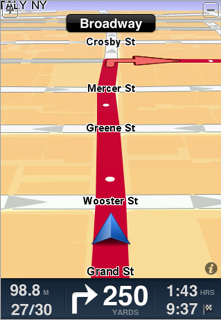
TomTom iPhone App fail? Maybe later?


Ok so I was waiting all summer for the TomTom iPhone app to hit the app store. I am a bit disappointed in the lack of options. I of course waited for others to download and try. Or should I say point out all the missing features and glitches. I'm surprised no one has mentioned that you can't change the pointer to look more like your car. What's up with that?

Here are a few screen shots I took from the app store of customer reviews. Actually none of them sound at all promising.

I'm also thinking that this app probably works better on the 3GS than the 3G because of the upgraded processing speed.

Click on each image to read the comments.


So TomTom I think its time to take it back to the garage and make a better app. Preferably more like one that you offer on all your stand alone units.

I won't be buying this app anytime soon. I think ill just stick to my good old google maps. Oh wait I have turn by turn with Onstar. And I just love that.

From the laptop of Bastian Gatten

Wikipedia Mobile released for iPhone


Wikipedia Mobile is now available though the iTunes store. This is the official app from wikimedia. The app offers an alternative to browsing Wikipedia's mobile version via the Safari app. Its App Store description states that the app's code is "100% open source and community built" and programmers are welcome to help with the app. So far it just offers simple search and history.

I would love to see an auto landscape and zoom mode. Maybe some bookmarks. Or maybe the ability to save an wiki for offline use. The use of copy and paste however does work with this app. Thanks for that. I look forward to future updates of this product.

Wikipedia Mobile is available for free though itunes app store using this link that takes you directly to the app store in iTunes on your computer or iPhone.

Screen shots are from my little test run.

So go download and wiki from the comfort of your iPhone or iPod Touch

Not sure how the open source of this project works. But by all means play with it and improve upon it.

-Bastian Gatten

Stumble Upon Toolbar